


In the vast landscape of modern gaming, our phones have become indispensable companions. From quick puzzle breaks to deep RPGs designed for touchscreens, mobile gaming has carved out its own massive niche. But what if we told you that your trusty Android device could do more than just run mobile-native titles? What if it could play some of your favorite PC games from your Steam library?
It sounds like science fiction, or perhaps a complicated streaming setup, but a fascinating development allows a selection of full-fledged PC games to run directly on your Android phone. While this isn’t a flawless, universal solution for every game you own, it opens up intriguing possibilities for mobile gamers looking to expand their horizons beyond traditional app store offerings.
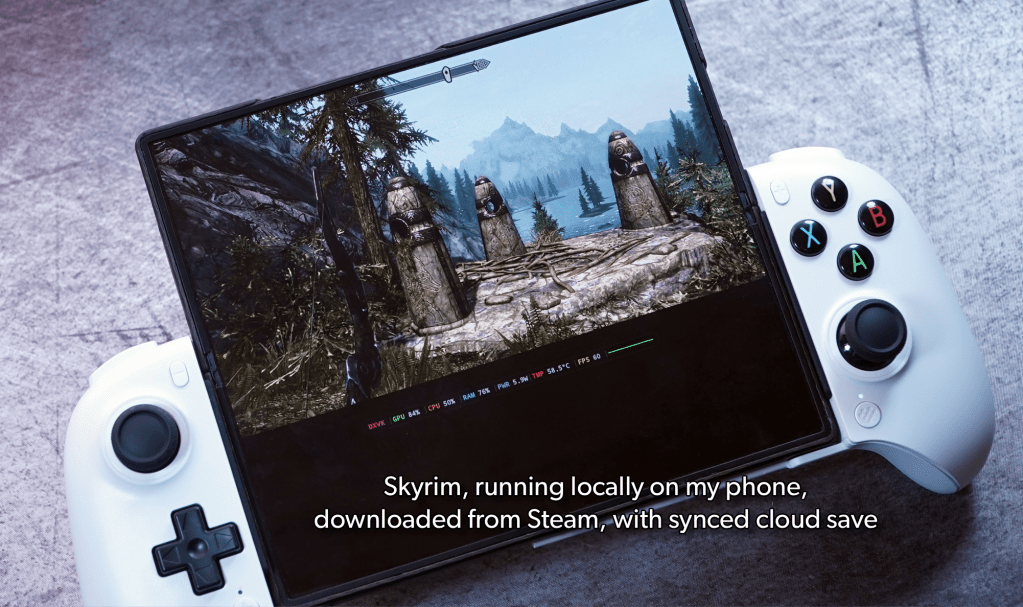

This capability leverages some of the same innovative technology that powers devices like the Steam Deck, allowing Windows-based games to function on different hardware architectures. However, as you might expect with such cutting-edge cross-platform integration, it comes with its own set of nuances and “jankiness.” Still, for those eager to experiment and get more utility from their existing devices, it’s an exciting avenue to explore.
The Unexpected Bridge: GameHub App by GameSir
The primary tool enabling this mobile PC gaming marvel is an application called GameHub, developed by the accessory company GameSir. If you’ve been in the gaming peripheral space for a while, GameSir is likely a familiar name, having produced various controllers and mobile gaming accessories. This established presence is reassuring, as it suggests GameHub isn’t a fly-by-night operation but rather a product from a company with a history in the gaming market.
Currently, GameHub is exclusively available for Android users. Unfortunately for iPhone owners, the underlying technological approach involves a level of system access and compatibility layering that is typically less aligned with Apple’s more closed ecosystem. So, for now, this particular adventure into mobile PC gaming remains an Android-only affair.
GameHub acts as an interface, connecting your Android device to popular PC game stores, including Steam and even the Epic Games Store. Unlike cloud streaming services that render games on remote servers and stream the video feed to your device, GameHub aims to download and run these “full-fat” PC games directly onto your Android phone’s local storage. This distinction means that once a game is downloaded, your experience is less dependent on a stable, high-speed internet connection for gameplay, though you’ll still need internet for initial downloads and potentially for cloud save synchronization.
How It Works: Proton Power on Your Pocket Device
The magic behind GameHub’s ability to run Windows-based PC games on Android hardware lies in a compatibility layer, specifically a flavor of the Proton compatibility layer. If you’re familiar with the Steam Deck, you’ll recognize Proton as the technology that allows countless Windows games to run seamlessly on the Deck’s Linux-based operating system.
In essence, Proton translates the instructions from Windows games into a language that Android and its ARM-based processors can understand. This sophisticated translation process allows games that were never designed for mobile operating systems or hardware to function, albeit with varying degrees of success, on your phone.
The process for users is designed to be relatively straightforward:
- Launch the GameHub app: Download and open the application on your Android phone.
- Log into your game accounts: Connect your Steam (and potentially Epic Games Store) account within the app. This grants GameHub access to your game libraries.
- Browse and Download: Select a game from your connected library that you wish to play. GameHub will then download the PC version of the game directly to your phone’s local storage.
- Play: Once downloaded and installed, you can launch and play the game directly through GameHub.
For games that support cloud saves on their respective platforms, GameHub can often integrate with these, meaning your progress might transfer between your PC and your phone, offering a truly continuous gaming experience.
The Reality Check: What to Expect When Playing PC Games on Android
While the concept is incredibly exciting, it’s crucial to approach this with realistic expectations. The source context describes the experience as “a bit janky,” and that’s a fair assessment. Running complex PC games on mobile hardware, even with a compatibility layer, is a significant technical feat, and not every game will perform perfectly.
The good news is that it *does* work, and certain types of games are much better suited to this setup than others. Our source notes that testing on a fairly powerful Android phone (a Galaxy Z6 Fold, which, while capable, was a couple of years old at the time of testing) revealed clear patterns in performance.
Predictably, less demanding 2D games and titles with simpler graphics tend to fare the best. For example, the article mentions “20 Minutes Till Dawn,” a minimal 2D game built on the Unity engine, ran without hiccups. This makes sense; such games require fewer computational resources and are less likely to encounter compatibility issues with graphics APIs or complex physics engines.
On the other hand, you should not expect to fire up the latest AAA blockbusters with ultra-high settings and enjoy a smooth 60 frames per second experience. Modern 3D games are incredibly resource-intensive, pushing even dedicated gaming PCs to their limits. Expecting a phone to replicate that experience, even a powerful one, is asking too much of the technology in its current state.
Optimizing Your Mobile PC Gaming Experience
If you’re keen to dive into playing Steam games on your Android phone via GameHub, here are a few practical tips to help you get the most out of the experience:
- Choose Your Phone Wisely: The more powerful your Android phone, the better your chances of a smoother experience. Devices with newer, high-performance processors and ample RAM will naturally handle the demands of PC games more effectively.
- Prioritize Low-Impact Games: Start with 2D indie titles, older PC classics, or games known for their minimal system requirements. These are your best bet for consistent performance. Think casual strategy games, visual novels, or pixel-art adventures.
- Invest in a Controller: While some games might offer touch controls, most PC games are designed for keyboard and mouse, or a gamepad. A good Bluetooth controller will significantly enhance your playability and comfort. GameSir, the developer of GameHub, also makes a range of compatible controllers.
- Ensure Ample Storage: PC games can be massive. Make sure your phone has plenty of free internal storage or supports expandable storage (via microSD card, if applicable) to accommodate game downloads.
- Manage Expectations: This is not a replacement for a dedicated gaming PC or a Steam Deck. It’s an experimental, sometimes “janky,” but ultimately exciting way to play some PC games on the go. Be prepared for occasional glitches, lower frame rates, or games that simply won’t run.
- Stay Updated: Keep the GameHub app updated to the latest version. Developers frequently release updates that improve compatibility, performance, and stability.
This development is genuinely exciting, offering a taste of PC gaming freedom on a device many of us already carry everywhere. While it won’t replace your desktop rig for high-fidelity gaming, it presents a compelling option for those looking to enjoy a different kind of gaming experience on their Android phone.
The ability for your Android phone to play some Steam games locally is a testament to the continuous evolution of mobile technology and compatibility layers like Proton. It’s a niche, somewhat experimental, but ultimately rewarding venture for gamers willing to embrace its quirks. If you have a capable Android device and a Steam library waiting to be explored on the go, GameHub might just be the app you never knew you needed.
Ready to try out PC games on your Android? Download the GameHub app and share your experiences with us!
Source/context: Your Android phone can play some Steam games. Here’s how. This is a draft summary and should be reviewed before publishing.